Free Google Ad Keywords Generator
A simple way to generate Google Ads keywords for free
Watch the quick walkthrough, then use our free Google Ads keyword generator to build a clean keyword list and clusters from your target URL + seed keyword — ready for ad groups and launch.
Google Ads keyword ideas from your URL
Keyword clusters for ad groups
Broad / Phrase / Exact suggestions
Preview now, unlock full results after signup
How to use the Free Google Ad Keyword Generator
Add your Target URL
Enter a seed keyword
Get keyword clusters
Receive keyword ideas grouped for ad groups, with match-type hints and quick negative suggestions.
Why Google Ads keywords matter
Search
↓
Keyword
↓
Ad group
↓
Ad
↓
Landing page
How to use your keywords in Google Ads
Use keywords in Headlines
Mirror intent in Descriptions
Keep ad groups tight
Add negatives early
Match types and intent (quick guide)
Phrase match
Exact match
Broad match
Keyword clustering makes campaigns easier to build and optimize
A raw keyword list is hard to turn into a campaign. Clusters solve this by grouping searches into ad-group themes, so you can write ads that match each intent and measure performance clearly.
Mini example
Pricing cluster: “{keyword} pricing”, “{keyword} cost”, “{keyword} plans”
Alternatives cluster: “{keyword} alternatives”, “{keyword} vs”, “best {keyword}”
Local cluster: “{keyword} near me”, “{keyword} in {city}”
How to Use the Free Google Ad Keyword Generator (and build a full campaign in Adinflow)
Why Google Ads Keywords Matter
Google Ads doesn’t work because you “run ads.” It works because you match user intent at the exact moment someone searches. Keywords are the link between what a person types into Google and the offer on your website.
When your keywords are too broad, you risk paying for irrelevant clicks. When your keywords are too narrow, you miss demand and don’t scale. The goal is to build a keyword set that:
matches what you sell,
captures high-intent searches,
and is organized into focused ad groups so your ads and landing pages stay relevant.
That’s why keyword generators are useful — but what really improves campaign quality is keyword clustering (grouping similar search intent together) and using match types intentionally.
Key Functionalities (What this page helps you do)
Here’s what you can do with this Free Google Ad Keyword Generator preview:
Keyword ideas from your URL + seed keyword
You provide the Target URL so the tool understands your offer and can generate more relevant suggestions than a generic list.
Keyword clusters for ad groups (intent-based)
Instead of dumping a random list, keywords are grouped into themes you can use as ad groups (pricing, service, alternatives, local intent, etc.).
Match-type hints
You’ll get guidance for Broad / Phrase / Exact so you can balance reach and control.
Negative keyword hints (basic)
A starting set of “avoid” terms that commonly waste budget when they don’t match your offer.
Campaign-ready next step inside Adinflow
If you want more than a keyword list, Adinflow can generate the full Google Search campaign structure and ads, ready to export and test.
How to Use the Tool (Step-by-step)
1) Enter your Target URL
Paste the landing page you want to promote. This helps align keyword ideas with your actual product/service. If your URL is too generic (e.g., a homepage with many offers), use the most specific landing page you can.
2) Enter your seed keyword
Add the main keyword you want to target. Think “what would a buyer type into Google?” Examples:
“crm for small business”
“emergency plumber”
“email marketing software”
“accounting service madrid”
3) (Optional) Add location intent
If you serve a specific area, include a city/region concept in your keyword strategy. Local intent keywords often convert better because the user is closer to action.
4) Click Generate
You’ll see a preview of keyword ideas and clusters. Use these clusters to plan ad groups and write ads that match each intent.
How to Use Keywords in Google Ads (Practical guidance)
Keywords don’t just live in a list — they drive how you structure the campaign and what you write in ads.
Use your core keyword in Headline 1 (when it makes sense)
Headline 1 is usually the strongest “message match” signal for the user. If someone searched “{keyword} pricing”, a headline like “{Keyword} Pricing” or “Plans & Pricing” feels instantly relevant.
Write one ad group per intent cluster
Don’t mix “pricing” keywords with “how-to” or “best tools” keywords in the same ad group. Different intent requires different copy. Clusters make this easy.
Match descriptions to intent, not just the exact keyword
Descriptions should explain the value, proof, and CTA. If the intent is “pricing,” users want cost clarity. If the intent is “service near me,” they want availability and trust.
Add negatives early to protect budget
If you sell a paid product, “free” might be a negative keyword. If you’re not hiring, “jobs” might be a negative keyword. Negatives reduce irrelevant clicks and improve performance faster.
Match Types Explained (Simple version)
Match types control how closely the user’s search must match your keyword.
Phrase match is a great starting point for most campaigns because it catches variations while keeping intent reasonably tight.
Exact match gives strong control and is ideal for high-intent keywords you want to measure cleanly.
Broad match can expand reach, but it requires careful management (smart structure + negatives + clear landing page intent). It can be powerful, but it’s not always the best default when you’re starting.
A good beginner-friendly approach is: start with Phrase + Exact on high-intent clusters, then expand carefully.
What is Keyword Clustering (and why it’s important)?
A raw list of keywords is not a campaign. A campaign needs structure: ad groups, ads, and messaging that fit each intent. Keyword clustering is the step that turns research into something you can actually launch.
For example, these clusters should not be mixed:
Pricing intent cluster
“{keyword} pricing”
“{keyword} cost”
“{keyword} plans”
Alternatives / comparison cluster
“{keyword} alternatives”
“{keyword} vs {competitor}”
“best {keyword} tools”
Local intent cluster
“{keyword} near me”
“{keyword} in {city}”
“{keyword} {district}”
Each cluster becomes an ad group. Each ad group gets ads that match its intent. That’s how you make Google Ads feel relevant — and relevance is what drives clicks and conversions.
Want More Than Keywords? Build the Full Search Campaign in Adinflow
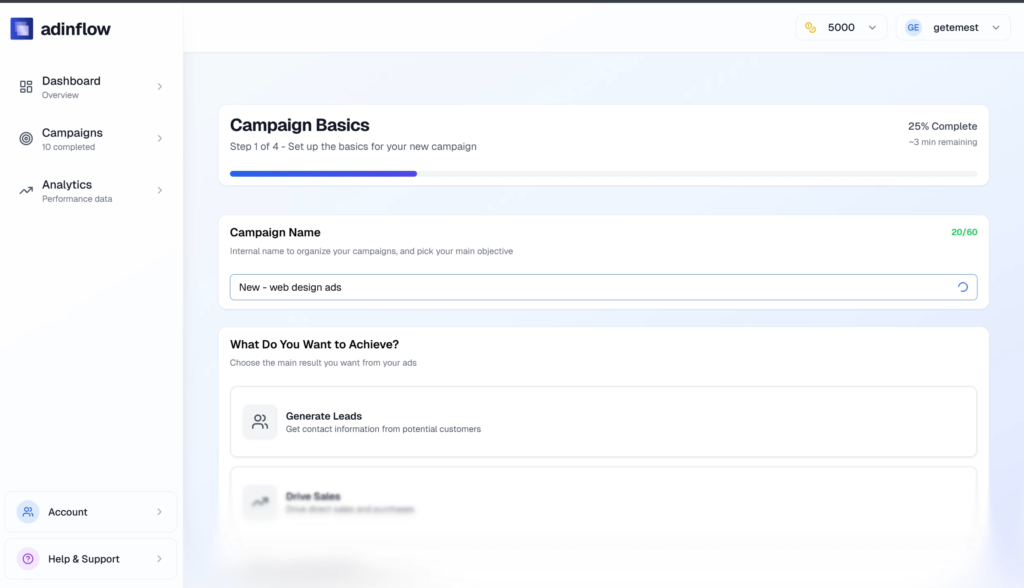
This page gives you a fast keyword starting point. But if you want the real time-saver, Adinflow can generate a complete Google Search campaign end to end — using your website, keyword intent, location, and budget.
Inside Adinflow you can go beyond “keyword ideas” and get a structured campaign draft:
website analysis to understand your offer and messaging,
keywords clustered into ad groups,
headlines and descriptions generated per intent group,
budget and location used to shape the campaign context,
and an export-ready structure you can test in Google Ads.
If you’ve ever built campaigns manually, you’ll recognize how much time this removes from setup — and how much cleaner the structure becomes from the start.
What You’ll Get With the Free Trial
Try the full workflow: enter your website, choose a main keyword and location, set your budget, and get a complete Google Search campaign draft — structured with keyword groups and ads, ready to export and test.
Here’s what the process looks like:
Add your website + offer
Choose keyword + location
Set budget and campaign settings
Get a full campaign draft → export / test
The goal of the trial is simple: let you experience what it feels like when campaign setup is structured and fast — so you can focus on testing, optimization, and results instead of endless manual prep.
Tips for Better Results
Use the most specific landing page you have
A dedicated product/service page produces cleaner keyword ideas than a broad homepage.
Start with a buyer-intent seed keyword
Pricing, service, quote, booking, buy, near me — these often produce the most conversion-ready clusters.
Keep clusters tight
One cluster = one intent theme. This makes ad writing easier and improves relevance.
Use negatives as a habit
Negatives are how you protect budget and keep traffic aligned with your offer.
Treat the output as a starting point
The best campaigns are iterated. Start with structured keywords, then refine using search terms, performance, and real results.
FAQ
Is this a free Google Ads keyword generator?
Yes — you can generate a free preview of keyword ideas and clusters on this page. To unlock full results and campaign-ready structure, create a free account.
Do I need an account to see full results?
Yes. The preview is limited. A free account unlocks full keyword clusters and lets you generate a complete Google Search campaign draft in Adinflow.
How do I choose keywords for Google Search Ads?
Start with high-intent terms, group keywords by intent into ad groups, use match types intentionally, and add negatives early to avoid irrelevant clicks.
What are keyword clusters and ad groups?
Keyword clusters are groups of similar searches with the same intent. In Google Ads, clusters become ad groups so your ads match the searches more closely.
Can Adinflow create a full Google Search campaign?
Yes. Adinflow uses your website plus your keyword, location, and budget to generate a structured campaign draft with ad groups and ads.
Can I export the campaign to Google Ads?
Yes. Once your campaign draft is ready, you can export it and use it in Google Ads to test and iterate.
Does this help with match types (broad/phrase/exact)?
Yes. The output includes match-type guidance so you can balance reach and control based on intent.
Will the generated keywords always be perfect?
Treat them as a strong starting point. Refine by adding negatives, tightening clusters, and aligning ads with your landing page message.
Feedback
We’re continuously improving the workflow. If something feels unclear or you want more control (industry, offers, tone, competitors, negatives), share your feedback inside the app — it helps us make the generator and campaign builder more useful for real PPC work.