Running Google Ads today is not what it was five years ago.
More competition, more automation, more data — and far more ways to waste budget if decisions are wrong.
Manual Google Ads management doesn’t scale anymore.
Campaign structures are complex, keyword intent is fragmented, creatives need constant testing, and performance data changes daily. For most teams, reacting fast enough is impossible.
That’s where AI Google Ads comes in — not as hype, but as a practical layer that removes manual work and improves decision-making.
AI doesn’t replace marketers.
It replaces repetitive execution and surfaces better choices faster.
This page explains what AI actually does in Google Ads, where it works, where it doesn’t, and how modern tools use AI to improve real campaign performance.
What Is AI in Google Ads?
AI in Google Ads refers to the use of machine learning models to analyze data, predict outcomes, and automate decisions across campaign setup, optimization, and reporting.
It’s important to separate real AI usage from buzzwords.
In practice, AI for Google Ads is used in three main ways:
Where AI Already Works Well
-
Bidding & budget decisions based on conversion probability
-
Keyword pattern recognition and intent grouping
-
Ad copy variation testing at scale
-
Performance analysis across large datasets
Google itself uses AI heavily inside
Google Ads — especially in smart bidding and auctions.
Where AI Needs Structure & Data
AI does not magically understand your business.
Without clean inputs, AI systems struggle with:
-
New accounts with no conversion data
-
Poorly structured campaigns
-
Mixed intents in one ad group
-
Unclear goals or tracking issues
That’s why AI works best on top of a solid campaign framework, not instead of it.
How AI Improves Google Ads Campaigns
When applied correctly, AI improves performance across the entire campaign lifecycle.
Keyword Research & Clustering
AI analyzes large keyword sets and groups them by:
-
Search intent
-
Funnel stage
-
Commercial value
-
Semantic similarity
This results in tighter ad groups, higher relevance, and better Quality Scores — without manual sorting.
Campaign Structure
Instead of flat or bloated structures, AI helps create:
-
Separate campaigns by intent
-
Clean segmentation (brand, non-brand, high intent, exploratory)
-
Scalable naming and hierarchy
This structure makes optimization easier and data more actionable.
Ad Copy Testing
AI Google Ads systems generate and test multiple ad variations:
-
Headlines aligned with keyword intent
-
Descriptions optimized for conversion, not length
-
Asset combinations tested continuously
This speeds up learning cycles without constant manual rewrites.
Budget Optimization
Rather than static budgets, AI reallocates spend based on:
-
Conversion likelihood
-
Marginal performance gains
-
Campaign priority
-
Real-time signals
The result: less wasted spend and faster performance stabilization.
Performance Analysis
AI monitors performance patterns humans miss:
-
Declining keyword clusters
-
Budget bottlenecks
-
Creative fatigue
-
Scaling opportunities
Instead of raw metrics, AI surfaces decisions.
AI Google Ads Tools vs Google Smart Campaigns
This is where many advertisers get confused.
Google Smart Campaigns use automation — but that doesn’t mean they offer the same value as AI Google Ads tools.
Key Differences
| Factor | Google Smart Campaigns | AI Google Ads Tools |
|---|---|---|
| Control | Very limited | Full control |
| Transparency | Low | High |
| Strategy input | Minimal | Business-driven |
| Campaign structure | Abstracted | Fully visible |
| Scalability | Limited | Designed to scale |
Smart Campaigns optimize within Google’s black box.
AI Google Ads tools work on top of Google Ads, giving you structure, clarity, and control.
This distinction matters when budgets grow and performance expectations rise.
Who Benefits Most from AI Google Ads?
AI in Google advertising isn’t just for enterprise teams.
Founders
-
Launch campaigns fast
-
Validate demand without agencies
-
Focus on product and growth
Small Businesses
-
Avoid expensive trial-and-error
-
Compete with larger advertisers
-
Get structured campaigns without PPC expertise
See practical examples in
https://blog.adinflow.com/google-ads-for-small-business/
Agencies
-
Speed up onboarding
-
Standardize quality across accounts
-
Focus on strategy, not setup
In-House Marketers
-
Reduce operational workload
-
Improve testing velocity
-
Make data-driven decisions faster
Common Myths About AI in Google Ads
“AI is full autopilot”
False. AI improves execution, but strategy still matters. Inputs define outputs.
“AI will replace PPC specialists”
It won’t. It replaces repetitive tasks — not experience or judgment.
“AI works without data”
AI needs signals. The better the structure and tracking, the better it performs.
Understanding these limits is what separates effective AI usage from disappointment.
How Adinflow Uses AI for Google Ads
Adinflow applies AI across the full Google Ads workflow — not just one step.
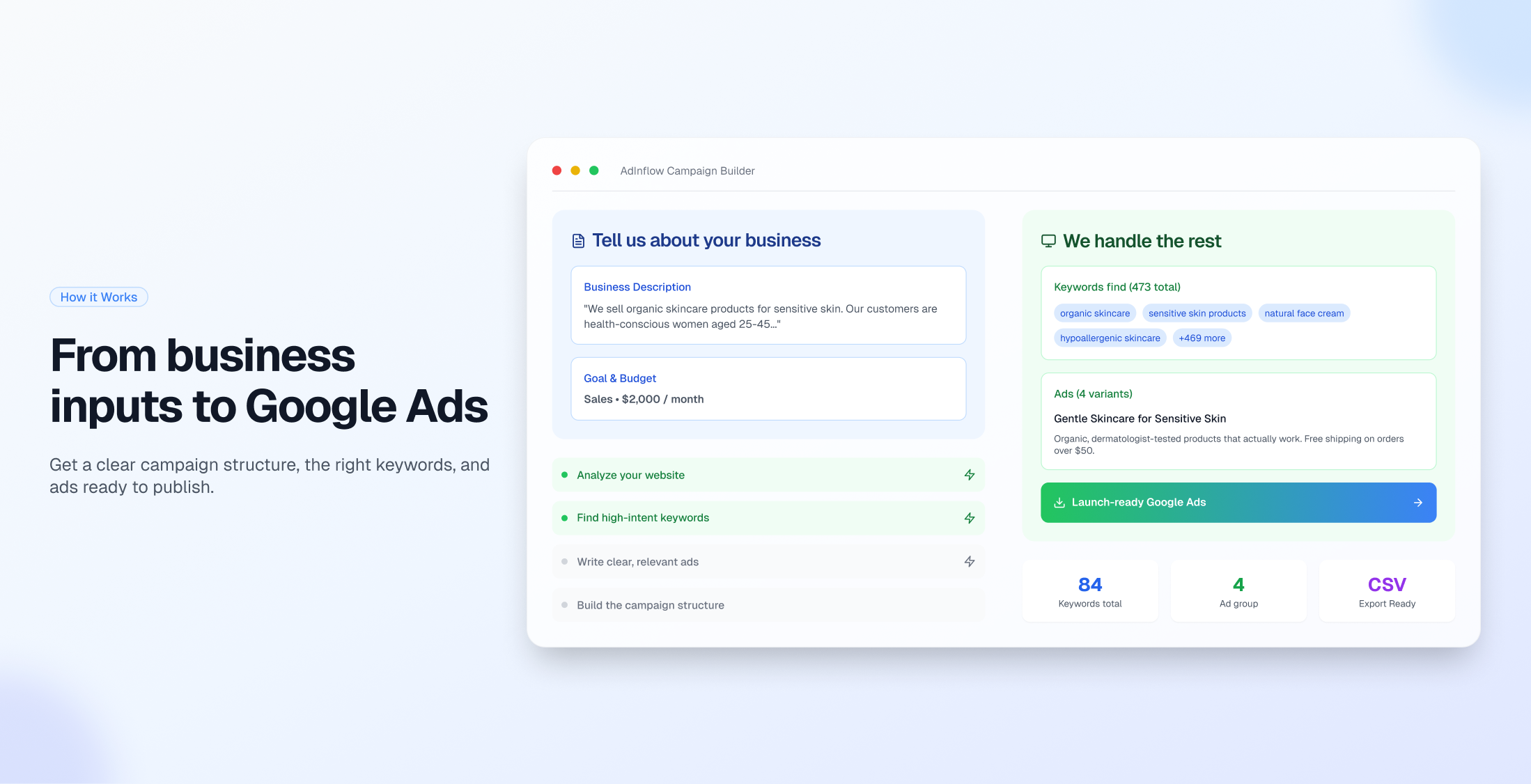
Strategy
-
Market and ICP analysis
-
Intent-based keyword planning
-
Campaign segmentation
Generation
-
Structured ad groups
-
Conversion-focused ad copy
-
Policy-compliant assets
Analytics
-
Performance visibility inside the platform
-
Clear signals instead of noisy metrics
Optimization
-
Continuous improvements
-
Faster iteration cycles
-
Smarter budget decisions
You don’t need to write prompts, patch tools together, or rebuild campaigns manually.
For a deeper breakdown, explore:
https://blog.adinflow.com/ai-for-google-ads/
https://blog.adinflow.com/ai-ads-generator-google/
If you want to see how AI Google Ads works in practice — from strategy to launch — you can try Adinflow here:
👉 Start a free trial:
adinflow.com
You can also read the previous step in this journey:
← https://blog.adinflow.com/google-ads-generator